Showing posts with label Heat Embossing. Show all posts

Wednesday, February 25, 2026

Pastel Fussy Cut Striped Card


Hello! I am back on the Blank Page Muse Blog with this card. The stamps I used on this card are the BPM Beyond the Border Mixed Media Set 1 clear stamps and the BPM Happy Birthday Phrase rubber stamp


Instead of using foam strips on this card, to add dimension to the fussy cut borders, I stacked several strips of scrap white cardstock cut at 1/4" wide. I stacked three pieces of the strips. In using strips, I created dimension without too much bulk a foam strip creates. The paper strips does not get squished flat like the foam adhesive when sent by mail. Best of all, I get to use my scrap paper stash. 


I adhered the stacked strip to the back of the fussy cut stamped border.


I adhered the stacked borders to a 4" x 5 1/4" white cardstock panel.


I adhered the borders alternating the colors until the panel is filled with the borders.


I adhered the panel to an A2 top folding note card. The sentiment was heat embossed on vellum using gold embossing powder. 

I hope you like today's project. Please visit the BPM Blog for more details on how I created this card. Have a blessed, brilliant and creative day!

Maria Giselle B.

I shared this card at


Thursday, December 25, 2025

A Shimmery Christmas Card, a Blank Page Muse Post


Hello! I am back at the Blank Page Muse blog with this card for an alternate take on Christmas theme. I was going for a steampunk design but ended up with a shimmery design for a card. But before I continue with the card, let me greet you all A VERY MERRY CHRISTMAS! I hope you are enjoying the holiday with your loved ones.


I used stamps from the Blank Page Muse Country Vintage Christmas Rubber Art Stamps Sheet Set. I did some embossing, fussy cutting and die cutting to create the scene. I used shimmer paper on this card except for the curved strip. 


I used a Glad Press 'N Seal to preserve the arrangement of the stockings as I add liquid glue to the back of the cut outs.


I hope you like today's card. Please visit the Blank Page Muse blog for details on the process of how I created this card. 

Thank you for visiting my blog. Have a blessed, brilliant and creative day!

Maria Giselle B.

I shared this card at


Saturday, March 22, 2025

World's Best Dad & Best Mom Ever Greeting Cards


Hello! Welcome back to my blog. I mixed several techniques in today's cards. I did the eclipse technique on a panel created with cardstock strips. I also did my all time favorite technique which is paper stitching. 

I created a dad card and a mom card which can be given any day, not only on Father's or Mother's day. That's why my subsentiment is a non-holiday/occasion sentiment. 

I started of with planning my color combinations for each card. I usually do a search online for color combos that will appeal to me. After going through my cardstock stash for the colors that I need, I trimmed these cardstocks into strips at 4 1/4" x 1/2". 

I adhered a double adhesive sheet on a printer paper cut at 4 1/4" x 5 1/2". I created two pieces of this panel. I adhered the cardstock strips to this panel making sure that each strip is butted to each other. After filling the whole panel with the cardstock strips, I burnished the panel with a scoring tool just to make sure that the cardstock strips are adhered well to the double adhesive sheet.


I die cut the letters from the Spellbinders Stitched Alphabet Etched dies on the panel. I kept every piece that fell off with the die cutting. I added stitching to these letters using DMC embroidery floss. I die cut two more pieces of each letter on black cardstock which I will use to add dimension to the stitched letters. 

I adhered another scrap piece of typing paper to the back of the striped panel. I pieced in the black die cut letters to the negative space on the striped panel. I pieced back the drop out pieces of the striped panel. I pre-treated the striped panel with an anti-static powder tool. I stamped a floral background to the mom panel using Versamark ink. The stamp I used is from Honey Bee. For the dad panel, I stamped several stars using stamps from the Altenew Halftone Stars stamp set. I used Versamark ink in stamping. I poured clear embossing powder to the sticky ink then heat embossed it.

I trimmed an 8th of an inch from each side of the panel. I adhered this striped panel on a 4 1/4" x 5 1/2" cardstock.

I adhered the rest of the letters to the panel by aligning the letters to the letters already pieced in the panel.

I stamped a subsentiment on a cardstock strip using dye inks. I adhered this to the panel.


I hope you like today's cards. Thank you for visiting my blog. Have a blessed, brilliant and creative day!

Maria Giselle B.


Altenew is holding its annual card drive which aims to send homemade cards to the elderly who lives in nursing homes or shelters, and let them know that they are not forgotten. After losing my parents, I feel this is the best way to honor them by making other parents feel special. I hope you consider joining this drive. Please visit the Altenew Celebrating Parents Card Drive 2025 post for details. 


Tuesday, May 23, 2023

Color Inspired Birthday Card


Hello! Welcome back to my blog. Today's project is part of Kat Scrappiness's Color Challenge Collaboration IG Hop. There are prizes for grab. I have the link at the bottom of this post so you can start hopping. 

I also created this card for my third son who celebrated his 18th birthday last Saturday. It was a busy weekend for him, having a track and field meet on his birthday, then his high school graduation last Sunday. 

This card involves die cutting. I have a dedicated die cutting plate which I usually place on the bottom of the die cutting sandwich. You can feel the love for it once you see it because of all the cuts created by all the dies cut on it. Sometimes part of a die does not fully die cut the paper when using an overused die cutting plate. This is when I use the metal shim to add more pressure to the die cutting sandwich when I ran it through the die cutting machine. Adding a metal shim when cutting intricate with intricate dies, just like the plaid background, will help come up with a clean die cut. 


I specifically love stacking die cuts to create dimension. It does not turn out perfect sometimes especially when you are stacking intricate dies just like the Happy Birthday sentiment, but this is hardly noticeable. Stacking die cuts is also a way of using up those scraps of cardstock or even patterned paper. 

Don't be afraid to add details to die cuts. I added embossed dots to the layering cake. I also added embossing on the rim of the cake.

Those cake stands that hold the sentiment are actually die cuts using a slim strip die. I encourage you to look beyond the intended use of your craft items and give it some new use.


And those negative die cuts from the plaid die, keep those. You never know when this comes handy. I keep mine in a container. I plan to use it to inlay it to the plaid background die cut just like what I did on this card or maybe create a tiled background. 

I hope you like today's card. I hope you join the KS's IG hop. Have a blessed, brilliant and creative day.

Maria Giselle B.


I added below links to the Kat Scrappiness products I used on this card. There will be no additional cost to you should you decide to purchase any of these products. While you are at the Kat Scrappiness website, do check out their wide array of products especially the exclusive Kat Scrappiness products. They have a new release, too!  


I am sharing this creation at

Sunday, April 16, 2023

Masculine Cards for AECP 2 Final Challenge

Hello! Welcome back to my blog. First & foremost, I want to apologize for a very long post. This is a celebration of me completing the AECP 2. I consider this the final exam of the program. 

Unlike the AECP 1, the final challenge for AECP 2 is less intense. I guess it is because I have gone through the courses so it is more easy for me. 

My chosen components for AECP 2 are as follows:

  1. Impressive Heat Embossing. Embossing is one of my favorite cardmaking techniques. A juicy sticky ink pad brings out the best results in embossing. The stamp positioner is a very helpful tool in re-stamping an image in case of missed spots. Don't forget to pre-treat the area that you will be embossing with an anti-static tool. Heat embossed images can act as a resist to inks, applied either by blending or watercoloring. An image with embossing preserves the color underneath it. Cards 1, 3 & 4 have some embossing done on it.
  2. Magic Marker. Who does not have a stash of markers and/or pens? I am guilty of this. Using markers to accent your stamped images is one way of using markers or pens. On my second card, I used a marker with a stencil. 
  3. Masking Unleashed. There are lots of ways to mask. You can use a masking paper, a masking glue or just simply emboss the image. This technique is further explained on my 3rd card.
  4. Easy Blending Techniques. With all the blending brushes out in the market, there are lots of possibilities in blending. Use a bigger brush for a large area and a detailed brush for a smaller area. Blending also allows you to experiment with colors. Just remember to always blend with a light hand. It is easier to add color to a lightly ink blended area vs. a heavily ink blended area. Pouncing your blender brush or sponge on a scrap paper first before blending the ink to your project usually removes the excess ink off the blending tool. Cards 1 & 3 both have ink blending done on it.

CARD 1: Coloring an image with Ink Blending and Color Pencils


Examine your image before heat setting the powder. Do not commit to heat setting the image if there are spots without powder. Pour powder again on these areas. If the powder still tends to slide off, it means that part of the image has no sticky ink on it for the embossing powder to stick on. If it is a huge part of the image, simply brush off all the powder onto a paper or to your embossing powder container. Re-stamp the image with the sticky ink. This is when a stamp positioner is very helpful. Pour embossing powder to the image. If the image is fully covered with powder, heat set it. 
 
Embossing and using a small blending brush are very helpful in keeping the colors within the lines. The blending above is not perfect but it gets better later on, I promise. This is what I call an undertone. With this image I did a sweeping motion of ink blending.

To add highlights, I used a color pencil. Be gentle when coloring near the embossed lines. We don't want to scrape off the embossing. But if it does get scraped off, I retouched the line with a white gel pen.


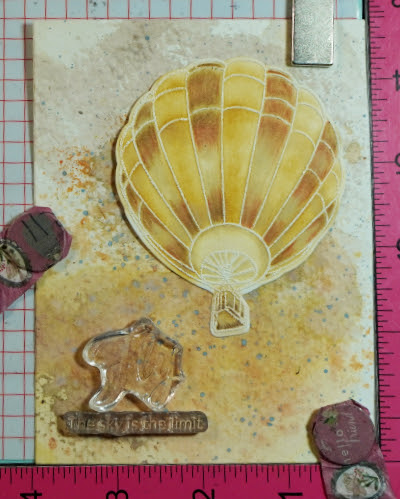
I smooshed ink on the background. I rubbed an ink pad on a glass mat and spritz this with water. I smooshed a watercolor paper on the ink. I dried this with a heat gun before smooshing the water color paper to another color. Just make sure you are using complementary colors or else you will end up with a muddy color. I flicked some pigment on the area too. On the photo above, I positioned the balloon so I would know where to stamp the sentiment. 

Despite re-stamping this sentiment, there seems to be a gap on that part of the letter F. So I retouched this using a black sign pen.


CARD 2: Adding Details using Markers


Secure the stencil to the cardstock with a non-tacky tape. This prevents shifting of the stencil during ink blending. For more intricate stencils, use a repositionable spray to temporarily adhere the stencil to the cardstock. 

Stencil over an area larger than your intended card size. This gives you an option to choose which part of your stenciled cardstock to use. Use the leftover piece, if you can, for another card.
Initially, I was struggling with this stencil on how to make the end result 3D looking. Despite the instructions included in the packaging, my end result is different from what the image in the packaging looks like. If you have struggles with a product you have, visit the manufacturer's website. Watch videos on how to use the product. This was very helpful to me in making me figure out what I was doing wrong. Write notes on a sticky note and insert this inside the package of the product for future reference. 

I used a marker to add highlights to the stenciled panel. I used the stencil as a guide to add lines. Felt pens dry quicker than gel pens. Let the gel pen dry first before taking the stencil off to avoid smearing the ink. 

Once I trimmed the stenciled panel to 4 1/4" x 5 1/2", I used the Misti Stamping Tool to stamp the sentiment on the panel. I used a light dye ink for the stamping so I can use a marker to write over the sentiment. Pardon my messy inky Misti. It just shows how much I use this tool in my crafting.

After I colored in the sentiment with a marker, I added an outline around the bold sentiment using a silver marker. The sub-sentiment is a one lined sentiment stamp. I masked a word to stamp one word at a time to change the stamp sentiment's look into a two-lined sentiment. Another option is to cut the one lined sentiment on the space between the words. 


CARD 3: Create a silhouette image using a detailed stamp


I usually lay out my stamp and/or die to know its placement on my card lay-out.

I stamped the image using the Misti Stamping Tool with a Copic friendly ink. I colored the image with a black Copic marker to make this detailed image into a silhouette image as seen below.

I am going to blend ink for the background. You can stamp the image on a masking paper and fussy cut it on the line. For my card, I applied sticky ink to the silhouette image using a Versamark pen. I poured clear embossing powder to it. I could have used a black embossing powder, too.

Using a Post-It note, I created a mask so I can create a background scene for the silhouette couple. I finished off this card by adding an embossed window cardstock panel over the scence. I sanded the embossed floral image then lightly blended a dark brown ink over the raised embossed area and also over the outer edge of the window panel. I also die cut an oval frame using brown cardstock which I also sanded and blended dark brown ink over it. The sentiment was die cut using white cardstock. I blended blue-green ink over the bottom half of the sentiment strip die cut to match the embossed window panel. I die cut extras so I can stack the sentiment strip die cuts on top of each other for a dimensional look.


CARD 4: Using floss for a window filler


I repeatedly stamped the star on a 4 1/4" x 5 1/2" green cardstock to create a background.

I heat embossed some stars to add interest to the background.

To another green cardstock panel, I did partial die cutting to create the stitching holes. I don't need to use the whole panel to add the floss. Also, I wanted the floss to meet at the center of the star shaped window.

To make sure that the star window will be die cut on the right spot of the embossed panel, I added a non-tacky tape to the non-cutting side of the star die. I laid this on the stitched panel, with the cutting side of the die facing up. I lined the embossed panel to the top of this stitched panel. I gently rubbed some pressure over the flipped embossed panel to make sure the tape will secure the star die to this panel. 

I gently flipped the panels sandwiching the star die, gave it another gentle rubbing pressure. I removed the stitched panel. Tada! The star die is adhered to the embossed panel just where I want it. The key here is to have both panels cut at the same size, and to make sure the stitching holes are centered on the panel.

I heat embossed a sub-sentiment on a strip of green vellum. I adhered this to the back of the star window panel to create a floating sentiment strip. I used the Misti Stamping Tool to help me with lining up both panels. Butting the card panels on one of the corners assured me that my panels are aligned. I also use this trick when I adhere my card panels to a note card. If you don't have this kind of stamping tool, a score board's corner can also be used for this purpose.

Now, the panels are aligned. The main sentiment is also heat embossed. Some parts of the sentiment were heat embossed over the already heat embossed stars. To be able to emboss over an embossing requires more than one stamping, thus, the stamping tool was very helpful in this regard. I used a dark green dye ink for the sentiments which is a fast drying ink. To be able to emboss this sentiment, after cleaning the sentiment stamp, I re-stamped the sentiment with a clear sticky ink, poured clear embossing powder over it and heat set it. 


Upcycle a Box into a Craft Storage Organizer

This is how I organize my craft supplies. I re-use sturdy boxes from grocery products.


Using a cardboard cutter, I cut the flaps off the box. I also cut the sides in an angle, with the front of the box lower than the rear portion of the box. If you have rough edges, use a sander to smoothen it out.

I painted the box with a white chalk paint. 

The bottom of the box has a rectangular hole where the seams did not quite meet. I covered this hole with one of the scrap cardboard cut up. I used a glue gun to adhere the scrap cardboard to the bottom of the box.
  
I trimmed one of my sons plastic binder divider and used it to cover the bottom of the box.

I painted each side of the box with Mod Podge glue using a sponge brush.I cut the tissue paper included in my Altenew order and adhered this to the side of the box.I smoothed out the tissue paper using a scraper. 

Now, I have a dedicated box for my Altenew products.

Thank you for visiting my blog. I hope you learned something from the cards I created. If you have any questions, feel free to post it in the comment section. 

6/2024: Altenew decided to change its affiliate program starting this month. Below is my affiliate link to the website. I don't think I can directly link the products I used with this new program. Please feel free to do a product search. I will update as I figure this out. The good thing about this new affiliate program is that I get to earn on each Altenew product you purchase and not only on the product/s I used on this project. As before, there will be no additional cost to you if you make a purchase. It is just a way to help a fellow crafter sustain her love for crafting. While in the Altenew blog, don't forget to check out their new release for this month. Thank you for your support!


I am sharing this creation at