Showing posts with label Winter. Show all posts

Saturday, December 7, 2024

3D Pop-Up Snow Globe Card


Hello! Welcome back to my blog. I am a guest designer at Send a Smile 4 Kids for the month of December. This month's challenge is Winter Cards 4 Kids. I hope you join their challenge.

My snow globe is not the typical snow globe with shaking elements inside. I created a snow globe that can fit inside an envelope, then pop-ups for display once taken out of the envelope. I also created a place to write a message on. 

I used products from Lawn Fawn because of its kid friendly images. The LF products I used are:
  1. Snowday Remix 6x6" petite paper pack
  2. Ready, Set, Snow stamp set and coordinating die set
  3. Ready, Set, Snow Shaker Add-on die set
  4. Winter Village stamp set and coordinating die set
  5. Stitched Hillside Borders
  6. Tiny Tag Sayings stamp set
  7. Mini Picture Frames die set
I die cut the patterned paper using the shaker add-on dies. I adhered an acetate on the back of the window die cut. 


For the layers, I partially die cut the bottom of the window piece so I only end up with the base piece. I die cut this piece on the same patterned paper I used for the window piece. I trimmed this in half. I scored this pieces at 1/4" on both ends. This will be the connecting piece for both the window and back die cuts.

I adhered one of the connecting pieces to the left side of the background die cut. I adhered the other end to the window piece making sure that the bottom portions line up with each other. 


For the snow banks, I partially die cut the snow slope included in the shaker add-on die set. I partially die cut this so I can extend the height of the slope. This slope will be adhered to the background piece.

For the middle snow slope, I used a 4"x2" piece of white cardstock. I die cut the slope on this piece using the border die. I used the piece without the stitching detail to coordinate with the slope on the background piece. I scored each end at 1/2". This will be the tabs that will be adhered to the connecting piece.

I pounced Versamark ink to the snow slope. I poured Judikins Iridescent Embossing Powder to the sticky ink then heat embossed it. 

For the elements of the snow globe, I stamped the trees from the LF Winter Village stamp set on the trees patterned paper from the paper pad. I used a green dye ink for stamping. I die cut the trees using the coordinating die. I added snow details to the tree using a Marvy Snow Marker. 

I stamped the snowmen from the LF Ready, Set, Snow stamp set on white cardstock. I used Memento Tuxedo Black ink since I am coloring the images with Copic markers. I used the same colors as the patterned papers in coloring the snowmen. I die cut the snowmen using the coordinating dies.

I adhered the tall slope on the background piece. I then adhered the trees to the background snow slope.

I applied liquid glue to the left tab of the middle snow slope. I adhered the tab to the connecting piece of the snow globe. Once the glue has dried, I adhered the snowmen on the middle layer snow slope.

I stamped several snowflakes on the back of the acetate. The snowflake stamp is from the LF Ready, Set, Snow stamp set. I used Stazon Cotton White ink in stamping. 

I applied liquid glue to the tabs on the right of the middle slope and the connecting piece. I flattened the snow globe to adhere the tabs to the window and background pieces. I made sure that the bottom edge of the snow globes are aligned. I set this aside to dry with something heavy on top of it for better contact.  

I stamped the sentiment on white cardstock using the same green dye ink I used for the trees. I used the Misti Stamping Tool in stamping. I re-stamped the sentiment using Versamark ink. I poured clear embossing powder to the sentiment, then heat embossed it. I die cut the sentiment using the coordinating die. I adhered this to the front of the snow globe.

I die cut two pieces of the background on green cardstock and another piece on patterned paper. I scored one of the green cardstock pieces about an inch from the top to create a fold. I adhered the other green cardstock die cut to the back of the snow globe to add stability to it. I applied liquid glue to the top portion of the scored green cardsctock die cut. I lined this up with the back of the snow globe. Now, I have a place to write my message for the recipient.


To embellish the back of the snow globe, I partially die cut a holly patterned paper using the background die. I stamped a sentiment on the center using a stamp from LF Tiny Tag Sayings stamp set. I used the same green dye ink I used for the trees. Since the sentiment is small and the design of the patterned paper is busy, I die cut a frame from the LF Mini Picture Frames die set on the same green cardstock I used earlier. I adhered the frame to the holly patterned paper making sure the sentiment is on the center. I adhered this holly patterned paper die cut to the back of the snow globe, underneath the score.

Below is a short video on how this snow globe looks like when taken out of the envelope, and how it pops up into a 3D snow globe. 


I hope you like today's project. Thank you for visiting my blog. Thank you, SAS 4 Kids challenge blog for having me again as a GD. 

Have a blessed, brilliant and creative day! Have a joyous holiday to you all!

Maria Giselle B.

I am sharing this project at


Friday, December 22, 2023

Stitching on Texture Plate


Hello! Welcome back to my blog. If you've been following me, you know that I love to stitch. Today's card is an example of my love for stitching. For this card, I am using The Greetery Aida Cloth Texture Plate. The moment I saw this product released, I fell in love with it right away. 

Most of the projects I saw using this texture plate is either using it for a background or stamping on it. The plate creates these these tiny holes. There are 7 boxes or spaces in between the holes per inch on the textured plate. It is recommended to use 6 strands of floss with this count but I only used 4 strands which came out okay. The stitching pattern I used is from Lawn Fawn

I stamped the mug on white cardstock. I colored the mug with Copic markers. I fussy cut the image leaving a small border around it. I incorporated the mug to the design by adding stitching to the handle to make it look like the snowman is holding the cup. 


I die cut a snowflake frame for the stitched snowman. The snowflake die is from Hero Arts. I used a My Favorite Things circle die to cut the window. I added details to the snowflake frame using a Simon Says Stamp 3D embossing folder. I lightly swiped a gray pigment ink to the embossed details of the snowflake frame. I die cut another snowflake frame to add a layer to the embossed snowflake frame.

I trimmed a bit off the edges of the stitched panel. I matted the panel with the same blue cardstock I used for the snowflake frame. 

I embossed the sentiment using a stamp and coordinating die from Lawn Fawn. The silver embossing powder I used is from Simon Says Stamp. I die cut additional labels and layered this underneath the embossed sentiment.

I stamped several snowflakes on the Aida background for additional details using a gray pigment ink. 

I added clear gems to the tips of the snowflakes. 

I hope you like today's card. Have a blessed, brilliant and creative day!

Maria Giselle B.

I am sharing this creation at

Wednesday, February 22, 2023

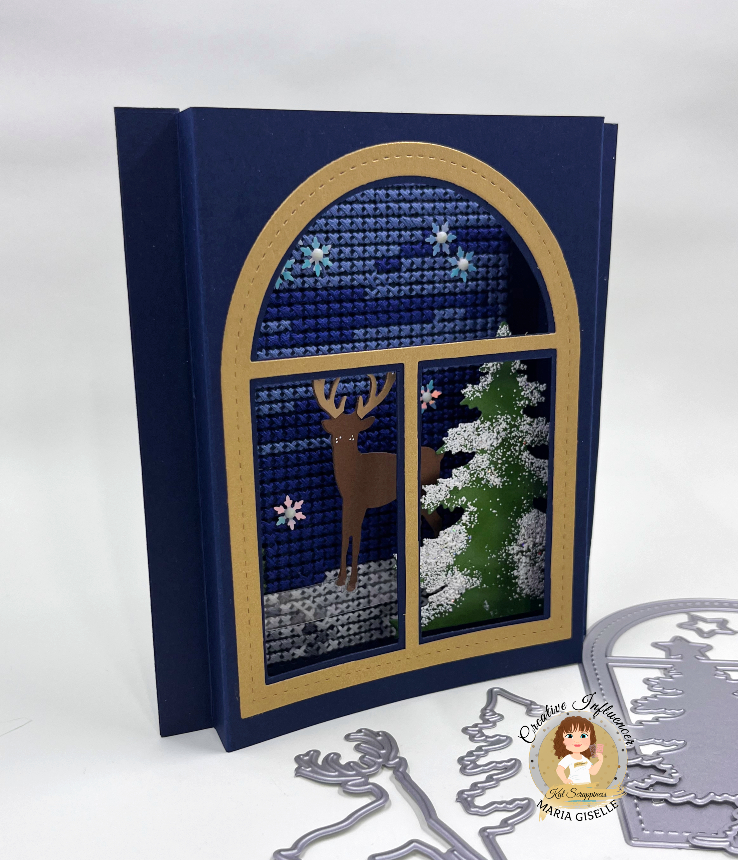
Pop-up Frame Winter Card


Hello! Welcome back to my blog. Sorry if I have been missing in action last week. I was busy with work and with projects which will be revealed in the coming week. Stay tuned for it!

I know that winter is almost done but I can't let go of this card idea so just bear with me this last time then I will shift gears to creating spring cards.

I got this pop-up card idea from Jennifer McGuire. I think the scene that I created works perfectly for this kind of card. 

I started off with cutting a navy-blue cardstock at 4 1/4" x 5 1/2". I added stitching holes to do this using the Crafty Meraki Stitch-a-Cross slimline die. I cross stitched the background for the scene.

I trimmed two pieces of blue cardstock at 6" x 5 1/2". I scored this at 1/2" and 1" on the long side at each end. I creased this really well using a bone folder.

On one of the folded panels, I traced the inside of the window from the Kat Scrappiness The Night Before Christmas Window Scene dies. I used a craft blade to cut the pieces off to create a window. There are areas where there is a gap in the tracing line because of the tree but I just cut this straight connecting the ends of the traced lines. I adhered the cross stitched panel to the other folded panel.

I die cut the elements that I will use for my card. I die cut the window on a matte gold carstock. I cut the tree on a green cardstock. I die cut the small reindeer from the KS Reindeer Duo dies on a brown cardstock and light brown cardstock. I cut two pieces of the deer on brown cardstock. 

I cut the tree off the window die cut, just following the lines of the window to cut it straight. I adhered this to the top of the blue panel with the window opening. Luckily, the window frame is smaller than the window frame. I thought that the window frame is exactly the same size as the window I cut. Now, I have a margin between the edge of the frame and the window. What a happy accident!

I blended green ink to the tree to create layers. On this inked portion, I dabbed Versamark ink. I mixed Wow! Midas Touch embossing powder and Wow! White Puff Powder embossing powder on a small jar. I poured this to the inked areas and heat embossed it. I repeated this several times.

For the deer, I cut the antlers off the light brown cardstock. I adhered this to one of the brown deer die cuts, making sure that the antlers are aligned. I applied Nuvo Midas Touch to the antlers. I adhered the deer's feet to an acetate strip using Glossy Accent. I adhered the other deer to the back of the deer. 


I adhered the tree to one side of the folded panel, on the fold. I adhered the tip of the acetate strip to the other folded panel. I adhered silver sequins to the cross stitched panel. I added glow in the dark gems to the center of the snowflakes. 

I added double adhesive tape to the folds and adhered it together. Now, my pop-up card is done. Below is a short video showing the interactive features of this card.


Thank you for viewing my card. Have a blessed, brilliant and creative day!


I added below the link to the Kat Scrappiness products I used on this card. There will be no additional cost to you should you decide to purchase a product. While you are at the Kat Scrappiness website, do check out their wide array of products especially the exclusive Kat Scrappiness products. There is also an ongoing slimline sale. Enjoy!

Maria Giselle B.

I am sharing this creation at


Friday, January 20, 2023

Monochromatic Winter Card

Hello! Welcome back to my blog. Today's card features products from Kat Scrappiness. I created a scene with a one color scheme as theme. I chose pink to create a feminine card. The first card I created using the deer die is a masculine card, A Die Cut from Background Die Cut.

I trimmed a light pink cardstock to 5 1/4" x 4". Using a falling snow stencil, I added white embossing paste to this card panel. After I filled up all the openings of the stencil, I lifted the stencil up and set the panel aside to dry. I washed the stencil right away using soapy lukewarm water. 

I started of with planning out the scene. I pulled out patterned papers from my scraps which has mostly pink on it. I die cut one of the patterned papers using the KS Buffalo Plaid Cover die. I adhered this to a white cardstock and set it aside to dry. I die cut this plaid panel with a stitched hill border die to create a slope.

I die cut the two trees from the KS The Night Before Christmas Window Scene die set on one of the patterned papers. I later on changed my mind and die cut these trees using pink cardstock. Not wanting to put the patterned paper tree die cuts to waste, I adhered this to the back of the pink cardstock tree die cut for a bit of dimension. I am using the reverse side of one of the trees. The tree die cut is cut straight on one edge. Reversing it makes this straight edge flushed to the  other side of the front panel which balances the scene with a tree on each side of the deer. I also added snow to the trees using a Marvy Uchida Snow marker.

For the deer, I die cut this on one of the patterned papers. The deer is from the KS Reindeer Duo die set. I strategically die cut the antlers on white cardstock. After a bit of trimming of this die cut antlers, I adhered this on top of the antlers of the pink deer die cut, making sure it is aligned. 

To embellish the deer, I applied Ranger Glossy Accents to the antlers. I spread this evenly over the antlers using a foam brush. I poured Tim Holtz Distress Clear Rock Candy Glitter to the antlers giving it a sparkly look. 

I created a scarf for the deer using a pink strip of cardstock. I die cut this using the thinnest strip die from the KS Stitched Slimline Strips die set. I wrapped this around the neck of the deer and carefully created a knot. I adhered this with liquid glue and use a tweezer to keep the knot pressed while the glue dries.

I heat embossed the sentiment on the deer's body using white embossing powder. 

Putting the scene together, I adhered the trees on both sides of the pink snow panel. I adhered the plaid slope. Then, I adhered the deer. I cut off the excess.

I adhered this panel to a top folding A2 note card. The scene panel was cut smaller thus, revealing a white border around it when adhered on the white card base.


I want to acknowledge the design inspiration for my card, Meg Loven of Loven Stamps. I card-lifter her gift card holder and created my version of it. 

Thank you for visiting my blog. Have a blessed, brilliant and creative day!

I added below the links to the Kat Scrappiness products I used on this card. There will be no additional cost to you should you decide to purchase a product. While you are at the Kat Scrappiness website, do check out their wide array of products especially the exclusive Kat Scrappiness products. They also have a new release of Valentine themed products. Enjoy!

Maria Giselle B.

I am sharing this creation at

Inspired By Challenge Blog~Inspired by the color pink.


Monday, December 16, 2019

Ink Blended Scene Card


Hello! We have a new challenge at Incy Wincy Designs Challenge Blog. Our challenge theme for today is Happiness. Since it is still pretty much the holidays, it can be a card with Merry Christmas and/or Happy New Year themes. I chose to interpret the theme as to what brings me happiness. The image supplied by our generous sponsor, Limited Runs, is a scene of mountain slopes covered with snow. Snow is very pretty undisturbed. I just don't like the cold it brings and the other hassles that come along with it if traveling. Looking at this image brings me peace, thus the sentiment.

I printed the image on Strathmore Bristol vellum paper with the help of the Cricut Design Space. I don't have any plans to cut the image using the Cricut. But the CDS is a big help for me when printing images since the laptop that is connected to my printer does not have a Word for Windows program installed in it. I made sure that the settings of my printer are on photo and matte since I plan to ink blend on the printed image. When this image got printed, I can see that the ink is still wet on the silhouette trees. I heat set this to dry to I can start applying ink over it.

I am using Tim Holtz Distress Oxide inks on the sky and snow banks. The colors I used are Broken China, Stormy Sky and Faded Jeans. I used the Picket Fence Studios Life Changing Blender Brush to apply the ink. The good thing about these brushes is that I didn't have to mask off anything. I was able to apply and blend the inks well.

I colored the cabin with Zig Clean Color Brush markers. I drew in lines to make it into a log cabin. I added highlights with Prisma Color color pencils. I added snow to the trees and falling snow using Uni-ball Signo white gel pen. I am not really good at adding falling snow so I used a Simon Says Stamp Falling Snow stencil to guide me where to add the dots. I also drew snow on the trees. I then added Marvy Snow Marker on the roof and the snow banks.

For the sentiment, I applied Coliro Pearl Deep Space watercolor on the same Bristol paper. I heat set this to dry. I die cut the letters using Sugar Pea Designs Message Letter Board Die. I wanted the color to be more bold so I added more watercolor pigment to the letters. I adhered this to the panel.


I drew a Christmas tree in one of the windows. I applied Ranger Glossy Accents to the windows.

I created a frame by die cutting stacking two rectangle stitched dies on a silver mirror cardstock. The dies I used are from Mama Elephant Peek A Frame Creative Cuts and Simon Says Stamp Stitched Rectangle Dies.

Thank you for visiting my blog. Have a blessed, brilliant and creative day. Please join us in our latest challenge at Incy Wincy. I cannot wait to see what makes you happy or how you express happiness in your creation.

Maria Giselle B.


I am sharing this creation at