Saturday, June 27, 2020

Holographic Vinyl in Greeting Card


Hello! I am organizing my craft room. On my table is a corner where I place newly purchased items that I would like to use first before adding it to the rest of my supplies. In this way, I will remember why I bought a product, and also make me remember that I have this product in my stach to hopefully avoid dual purchases. So for this card, the new items that I am featuring are the Paper Smooches You Are A Blessing die and PS Stitching Basic die set. 

I created this card to join the latest Paper Smooches Anything Goes Challenge. And, I created this to give to my 3rd son who will be celebrating his 14th birthday in July. One of his favorite colors is red.

I cut a 4 1/4" x 5 1/2" red cardstock. I created a pattern hearts on this panel using the heart die in the PS Stitching Basic die set. This die creates holes for you to stitch on. Instead of stitching, I added the small circle die cuts created by this die from a Cricut Holographic Vinyl. It is like diamond painting. It is a very tedious process but very relaxing except if you lose a dot die cut. I only did this on the top and bottom hearts, leaving the middle row of hearts as is.

On a white cardstock, I die cut the PS You Are A Blessing die. The die cut also comes with a stitched frame which I did not use in this project. I kept this frame and the negative cut aside for a future project.

Using the rectangular negative cut created by the PS You Are A Blessing die cut, I positioned the rectangle stitched die from the PS Stitching Basic die set. The width of this stitching die perfectly fits the negative cut. I used partial die cutting technique to extend the height of the rectangle. Since this die just pokes holes on the paper, I used a craft knife to carefully cut the edges and create this into a frame.

I adhered the frame to the red cardstock. I used the negative cut created by the PS You Are A Blessing die as a guide in adhering the letters. I painted the colors with a red Karin Decobrush marker, putting the pigment on the bottom edge of the letters only. To spread the pigment, I used a Spectrum Noir Clear Sparkle Pen. 


To cover the holes of the hearts behind the sentiment, I used the left over holographic vinyl by adhering this to a top folding note card, making sure that it will be behind hearts in the middle row. I then adhered the red panel.


Thank you for visiting my blog. In case you don't know yet, Paper Smooches is retiring its brand. There is a retirement sale going on. I am truly going to miss this brand for its fun and playful images and fonts. Check out their site and see if there is something you like. 

Happy Birthday, Yrwin. You truly are a blessing.

Have a blessed, brilliant and creative day everyone! 

Maria Giselle B.

I am sharing this creation at

Thursday, June 25, 2020

Music Inspired Birthday Card


Hello! My oldest son's birthday will be next month. He is deployed at South Korea. I am not sure how quick mail reaches S.Korea from the U.S. so I made this card and mailed it early. My son is a musician, thus, the theme of this card. 

I also created this card to join Altenew's latest color inspiration challenge. I am using Altenew Happy Birthday To You stamp set and Treble Love die set. 

On a 4 1/4" x 5 1/2" Neenah Solar Whitecard stock, I blended Altenew Paper Bag ink. I set this aside to dry. Once it has dried, I heat embossed the music notation repeatedly with the help of the Misti Stamping Tool to create a background. I used the Altenew Peach embossing powder on this. For the Happy Birthday lyrics, I repeatedly stamped this using the Misti Stamping Tool, heat embossing it with Simon Says Stamp Rose Gold embossing powder. 

I blended Tim Holtz Stormy Sky Distress Oxide on Neenah Solar White cardstock. I want to extend the die cut to 4 1/4" covering the whole width of a tall card so I partially die cut this paper using the staff die.. 

I adhered an acetate on the back of the staff die cut. I heat embossed the Happy Birthday sentiment on a blue vellum using Paper Source Navy Blue embossing powder. Using a Xyron Sticker Maker, I adhered two blue vellums on top of each other. I die cut the clef on this layered vellum. There is a bonus heart die cut with this cut which I used as well. I applied Zig Wink of Stella clear to the clef and the heart die cuts. 

I inked a blue cardstock with TH Stormy Sky Distress Oxide which will serve as the background for the window. I stamped different note stamps from the stamp set with Delicata White Shimmer pigment ink. 


I created the window on the inked panel by cutting these into two pieces. I adhered the staff die cut to these pieces. I adhered this window panel to the the blue cardstock using fun foam. I adhered the vellum die cuts to the window area. I adhered this to a top folding note card. 

Thank you for visiting my blog. Have a blessed, brilliant and creative day!

Maria Giselle B.

I am sharing this creation at


Monday, June 22, 2020

Cricut Cake 3D Cut


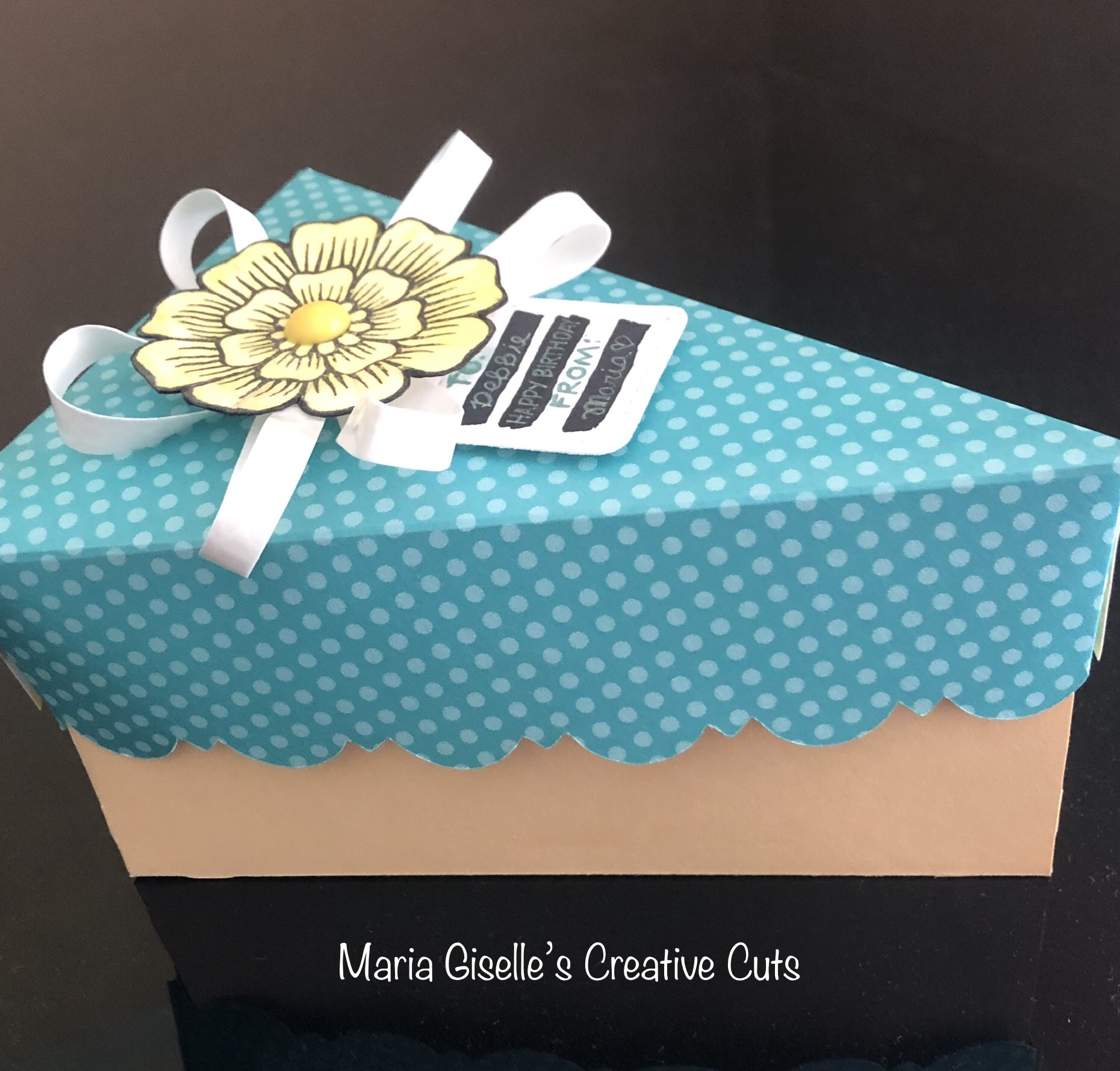
Hello! I created this cake box to share a slice of the mango cake from my previous post to a co-worker who just celebrated her birthday this past week. It was a challenge to create this box. I have to use my Cricut Imagine to cut this. Yes! After a very long time of not using this machine, I have to use it. I don't have a cake box in my Cricut Design Space images. I know purchasing the image does not cost a lot but I still have some Cricut cartridges. This cut is from the Close To My Heart Artiste cartridge which I purchased used and already linked. It has a lot of cuts which I love but fail to use because it has become more convenient to use the CDS. Anyway, it was a challenge using this machine again. I realized that the Imagine mat is not as sticky as the Explore mats even if it is a new mat. My first attempt to cut was a failure because the cardstock moved. So on my next round, I taped the edges of the paper. The other difficulty I encountered is the sizing of the cuts. My cake box lid ended up being larger than the bottom. On my second attempt in cutting, I decided to modify the cut lid instead of cutting another cardstock for the third time with the possibility of another paper waste. I don't think the recipient will even notice this.

The other challenge is that after my machine has been in long time hibernation mode, it took a lot of attempts to break it in so that it will let the mat feed in. 


To jazz up the lid, since I am on a time crunch, I looked through my stash, instead of creating a new one. I found this Altenew stamped and colored flower ready to be used. I created a bow using a transparent washi tape adhered to a white cardstock which I cut into strips using a craft knife. I curled the strips using the Cricut scraper. I adhered the bows to the back of the flower, then adhered this to the lid. 

For the tag, I die cut a white cardstock using Lawn Fawn Tiny Tags. I colored in some black stripes using a Copic marker. I sneaked this under the flower using a glue dot to keep it secured.


Thanks for visiting my blog. Have a blessed, brilliant and creative day!

Maria Giselle B.

I am sharing this creation at

Sunday, June 21, 2020

Cricut Father's Day Cake Topper


Hello! Happy Father's Day to all the fathers out there. I created this toppers to decorate the cake I bought to celebrate this day for my husband and our fathers, we call Amang (my father) and Pa (my husband's father) respectively. I changed our fathers greetings to how they are called as grandfather by my sons, Lolo (my father) and Daddy-Lo (my husband's father).

Another thing to celebrate for us is the opening of a Filipino bakery here in St. Louis, the Saint Louis Filipino Bread. They sell a Mango and an Ube cake. I opted for the mango since my youngest son loves mangoes, maybe he will like this cake and he will help me eat it since my husband is not a cake eater. 

The cut design is from Cricut Design Space. I modified the cut, slicing off a portion of the sentiment so I can customize it. I was planning to cut the names as well but opted to heat emboss it on the cut out mug. 

The secret to a successful Cricut cut is to make sure the blade is sharp. It sure could have saved me a lot of time, effort and resource if I acknowledged the signs that my blade needs replacement. Other than a warped cut, if your cut image comes off with the rest of the cardstock or paper when you peel if off the mat, that is one sign that the blade needs replacement. Good thing that I have a new blade replacement on hand. 

As for the warped cuts, I decided to use some of these cuts instead of throwing it. I adhered the mug cut out to the back of the same mug cut for added dimension. 


I cut extras of the solid mug so I can sandwiched a stick in between these layers. I wrapped the tips of these sticks with foil before sticking it into the cake. 


Thank you for visiting my blog. Have a blessed, brilliant and creative day! 

Maria Giselle B.


I am sharing this creation at

Monday, June 15, 2020

Polygon Background Blessed Card


Hello! I created this card for the Honey Bee Stamps Buzzworthy Challenges in FB. One thing I like about joining this challenge is that I work my creations around the limited Honey Bee supplies that I have. But I am slowly building up my Honey Bee Stamps collection.

I die cut different colored cardstocks based on the colors in the color palette. I am using the second to the smallest die in the Honey Bee Double Stitched Polygons Honey Cuts. After I have cut a good amount of it, I trimmed a 5 1/2" x 4 1/4" typing paper to serve as a grounding place for the polygon die cuts. I run a tape runner over it and started adhering the polygons. 

For the sentiment, I die cut several pieces of the white cardstock using the HB Bless Your Heart Honey Cuts. I adhered this on top of each other to create a chipboard-like sentiment die cut. I applied embossing ink to the top layer using Wow! Mixed Media embossing brush. I poured Ranger Copper embossing powder to this, then heat set it. 


To complete the sentiment, I heat embossed the sentiment stamps from HB Bless Your Heart and HB Prayers stamp sets on a black strip of cardstock, using white embossing powder. 

I trimmed a sliver off from each side of the polygon background. I matted this on a black 5 1/4" x 4 1/4" black cardstock. 

I adhered the sentiment strips and die cut to the center of the panel. As a last touch, I adhered several sequins to the panel.


Thank you for visiting my blog. Have a blessed, brilliant and creative day!

Maria Giselle B.

I am sharing this creation at


Christmas Scene Card


Hello! We have a new challenge at Incy Wincy Designs. Our challenge is on Pets/Man's Best Friend/Fur Babies. Our sponsor is Dr. Digi's House Of Stamps.

I looked online for images of a sleeping dog on a couch and this is how I got inspired to create this card scene. I sketched my idea, taking notes on what supplies I will be needing. I was aiming to use one patterned paper collection but I had to look into another paper collection, My Mind's Eye, for the wall and the floor. 


I printed the image on Neenah Solar White cardstock. I created a sweater for the dog (although it looks like a blanket to me) by tracing the outline on the patterned paper. I used a tracing light pad to do this. It was difficult to do this on a double sided patterned paper but I just did my best. I traced the lines with a marker. I fussy cut this and ran a brush marker on the sides. I created a matching cap for the dog. I stamped hat on the same patterned paper and on a white cardstock. I fussy cut this and layered the white trim to the patterned paper. The cap was too wide for the dog. Using the original image as a guide, I modified the cap to make it custom fit to the dog's head. I cut this on the line and ran a black marker on the sides. I added Marvy Uchida Snow Marker on the trim.

I  colored the digital image with Copic markers. I added details to the sofa by adding dots. I also added stripes to the slippers.

Working on the scene, I fussy cut the Christmas tree from a Simple Stories cut apart patterned paper. I  cut a My Mind's Eye woodgrain patterned paper to 5 1/2" x 4 1/4" for the front panel. 

I die cut the window frame using Mama Elephant Peek A Frame Creative Cuts on a white cardstock. I die cut this window on the woodgrain patterned paper, too. This die cuts the window with the intent to have the window open. Since I am not going to use this feature, I taped the window on the back. I inked the white window frame with Tim Holtz Walnut Stain Distress Ink. I adhered this to the woodgrain patterned paper, lining it up with the cut window frame. 

I trimmed a piece of MME dotted bluish-green patterned paper. I inked the edges with Tim Holtz Peacock Feathers Distress Ink to give it an aged look. 


I adhered the Christmas tree. I added gift stickers to the base of the Christmas tree. I added the sentiment sticker which I adhered first to a white cardstock and made it into a banner. I adhered a gold star sticker on top of the Christmas tree. 

I created a snowy sky backgound fro the window. I splattered Copic Opaque White ink on a blue cardstock. I dried this with a heat gun. I adhered this to the back of the window panel, making sure it shows through the window.

I adhered the digital image with foam square. I colored the Christmas tree dots with Tonic Nuvo Aqua Shimmer pen. I added Nuvo Crystal drops and set this aside to dry.

Thank you for visiting my blog. I hope to see your creations in our blog challenge. Have a blessed, brilliant and creative day! Stay safe always.

Maria Giselle B.


Friday, June 12, 2020

My Son's Space Scene


Hello! If you came from my previous post, this is my 8-year old son's version of a space scene. He wanted to share his idea so I allowed him to play, too. I cut him a half of a Canson watercolor paper, right at 6". He placed his stamps pieces from Lawn Fawn Out Of This World stamp set where he wanted it stamped. My craft table does not allow two people working at the same time so I did the stamping for him using Versafine Onyx Black ink. He colored the images with Karin markers. He wrote speech bubbles for the sun and the planets which I hope you enjoy. 

Thank you for viewing my son's creation. I am sure he will appreciate if you can drop in a message for him. Have a blessed, brilliant and creative day from both of us. 

Maria Giselle B.

I am sharing my son's creation at